On this page
To apply for a Nepal No Objection Certificate (NOC) for studying abroad, register and submit your application on the Ministry of Education, Science and Technology’s official NOC Online Portal (noc.moest.gov.np). The government fee is NPR 2,000 per subject, paid online via eSewa, Khalti, or connectIPS after your application is verified.
Under MoEST’s official NOC service notice (2083/08/08), applying, requesting a new college or subject, verification, and NOC collection are all 100% online. If your citizenship date of birth matches Nepal’s Citizenship Information Management System (CIMS) and your academic record matches the central +2 or university record, your NOC is approved online and downloaded directly from My NOC without visiting the office in Sanothimi.
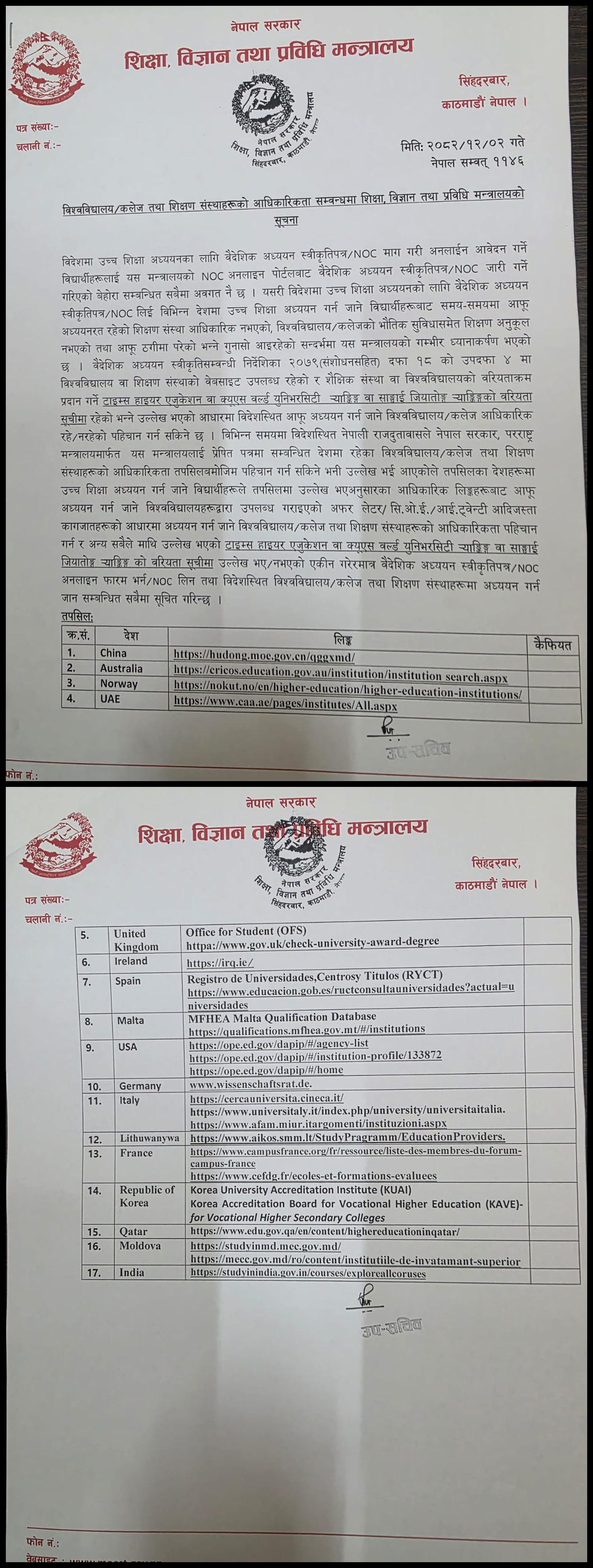
Last reviewed: November 25, 2026. Verified against the MoEST NOC Online Portal, the MoEST User Manual PDF, the 2083/08/08 online service notice, and the 2082/12/02 university accreditation notice.
Key facts at a glance
| Item | Verified MoEST rule |
|---|---|
| Official portal | noc.moest.gov.np (log in to My NOC to track and download) |
| Application fee | NPR 2,000 per subject (Government Revenue Head 14229, Rastriya Banijya Bank) |
| Online payment methods | eSewa, Khalti, or connectIPS using your system-generated EBP / Voucher Number |
| NOC collection | 100% online download for matched records; physical visit required only if CIMS/academic records do not match |
| Official support | Email noc@moest.gov.np or call 01-6635419 (Foreign Study Approval Section, MoEST) |
Who needs an NOC and current eligibility rules
Banks in Nepal generally require a valid MoEST NOC to process foreign-currency tuition and living-expense transfers, and many visa or university steps reference it. Because individual bank, destination, and programme rules can vary, confirm the exact requirement with your bank and university alongside MoEST’s rules below:
- Verify your destination institution first: MoEST’s institution accreditation notice warns students to confirm that their foreign university or college is officially accredited in its host country (for example, CRICOS in Australia, OfS in the UK, DAPIP in the USA, or KUAI/KAVE in South Korea) or listed in Times Higher Education, QS, or ARWU rankings before applying.
- Levels that do NOT receive an NOC: According to the live FAQ on
noc.moest.gov.np, MoEST does not issue NOCs for Level 3, Level 4, Certificate III, Certificate IV, Top-Up Degrees, or 1-year Diploma courses. - Currently restricted countries: The portal’s restricted-country list currently names Taiwan and Mauritius.
- Language courses: If you are applying for a language course, you must hold an accompanying academic offer and apply for both together—except for Japan, where standalone Japanese language study with a Certificate of Eligibility (CoE) is permitted.
- Engineering applicants (after 10+2 or equivalent): The portal specifies a minimum GPA of 2.4, at least C+ in Physics, Chemistry, and Mathematics (and minimum C in remaining subjects), with at least 50% aggregate overall and 50% aggregate in Physics, Chemistry, and Mathematics. Grade 11 passed students awaiting Grade 12 results can apply provisionally.
Documents to prepare before you start
Scan multi-page documents clearly and combine pages of the same document into a single PDF before uploading.
Core documents for most applicants
- Nepali Citizenship Certificate (clear scan of front and back) and a recent passport-style photo.
- Valid Passport (bio-data page; verify passport number and English date of birth carefully before confirming your profile).
- Academic transcripts for your qualifying level (+2 / PCL / Diploma for Bachelor’s applicants; Bachelor’s transcript for Master’s applicants; Master’s transcript for M.Phil/Ph.D. applicants).
- Offer letter, Admission letter, I-20, or CoA clearly stating your subject, academic level, and course duration (plus a Certificate of Eligibility for Japanese language courses).
- Official tuition / fee invoice letter from the institution.
- Copy of any previous NOC, if one was ever issued to you before.
Conditional documents by background or programme
- Foreign prior degree: An Equivalence Certificate (and degree awarded certificate where applicable). Read our TU/UGC equivalence guide if you need equivalence from the University Grants Commission in Nepal.
- Master’s in Engineering, Medicine, Nursing, or other regulated fields: A valid professional council registration license (for example, your Nepal Engineering Council license for engineering graduates, Nepal Medical Council, or Nepal Nursing Council license).
- Medical, Nursing, Health, or Aviation programmes: A pre-approval or eligibility letter from the Medical Education Commission (MEC), Nepal Health Professional Council (NHPC), NMC/NAMC/NVC, or Civil Aviation Authority of Nepal (CAAN) when required for your course. Check the live FAQ inside
noc.moest.gov.npfor MEC’s current required and exempted health-science lists. - Destination-specific items: For South Korea, include the Korean University Business Registration Certificate (and TOPIK results where applicable for language-plus-academic tracks). For New Zealand conditional offers, include your English language test certificate (IELTS).
- Students already studying abroad: Upload guardian citizenship, your old NOC, passport copy, valid visa page, Nepal immigration departure stamp and destination arrival stamp, a university bonafide letter, enrollment/offer letter, and invoice letter.
Step-by-step: how to apply on noc.moest.gov.np
- Register with your mobile number and email: Open noc.moest.gov.np, enter your active mobile number and valid email address under the application box, and click Proceed. Enter the SMS OTP sent to your phone (use Resend if it does not arrive within two minutes), then set a strong password.
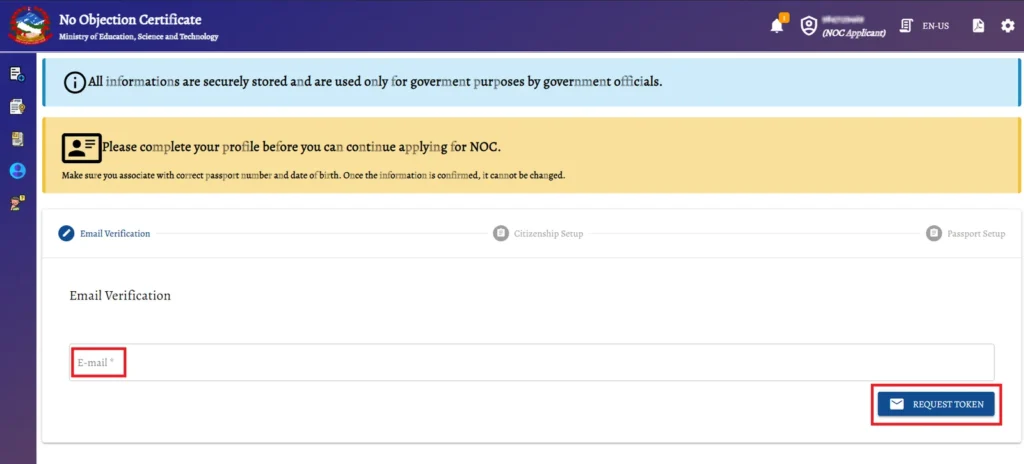
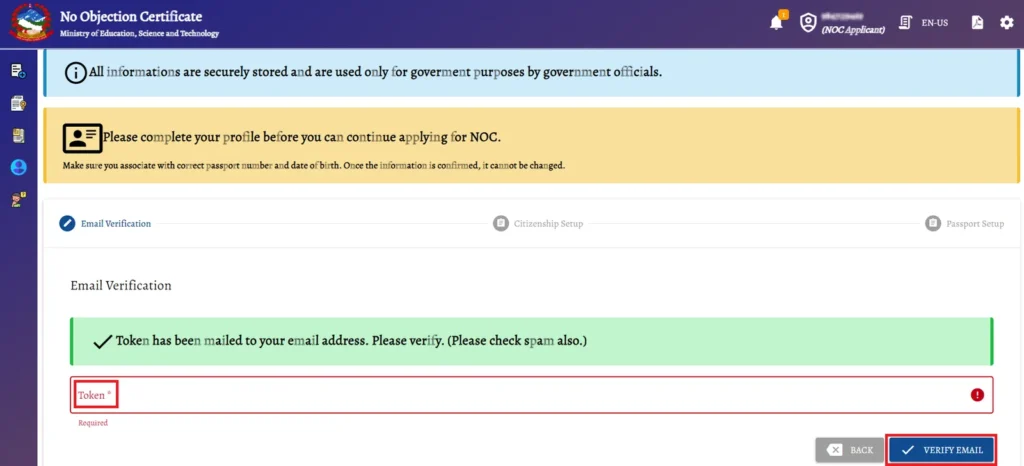
- Verify your email address: Log in and complete Step 1 of profile setup by clicking Request Token, copying the verification code sent to your email, and clicking Verify Email.
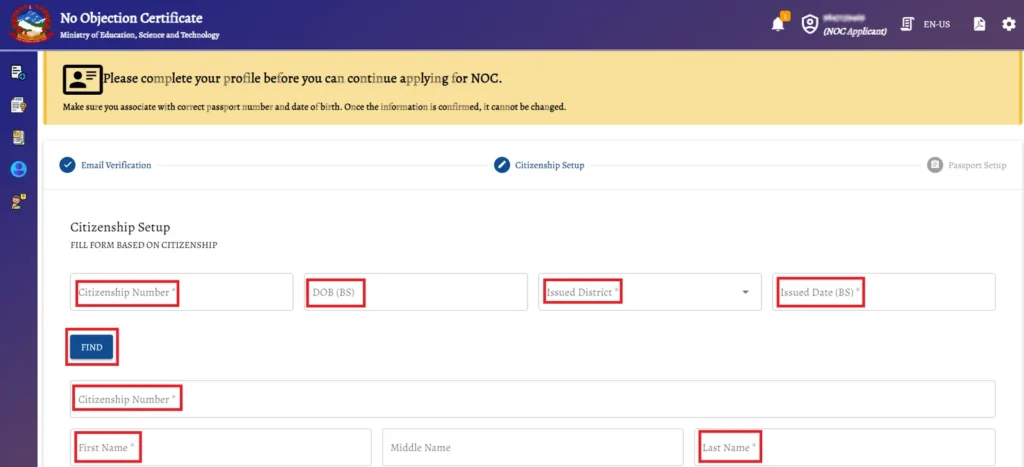
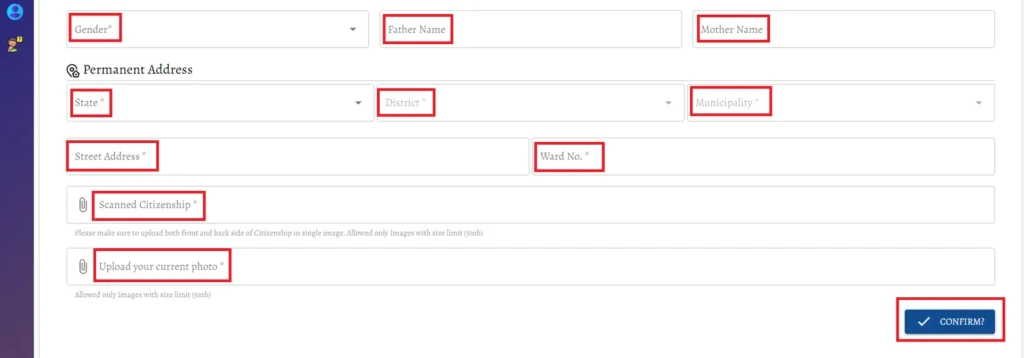
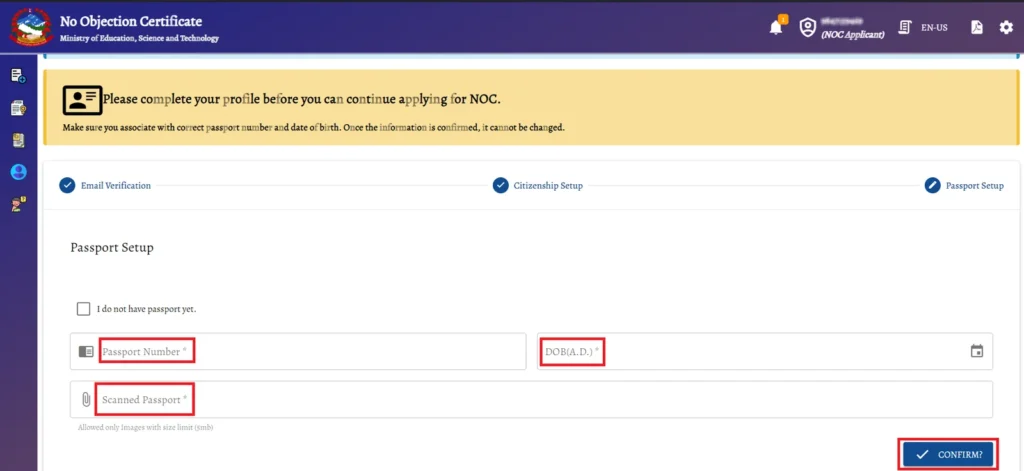
- Complete Citizenship (CIMS) and Passport setup: Enter your citizenship details—including issuing district and date of birth—exactly as printed on your citizenship certificate so the portal can verify your record in CIMS (Citizenship Information Management System). Upload your scanned citizenship and photo, then enter your Passport Number and Date of Birth (A.D.) and upload your passport scan. Double-check both fields: once confirmed, passport number and date of birth cannot be edited in your profile.
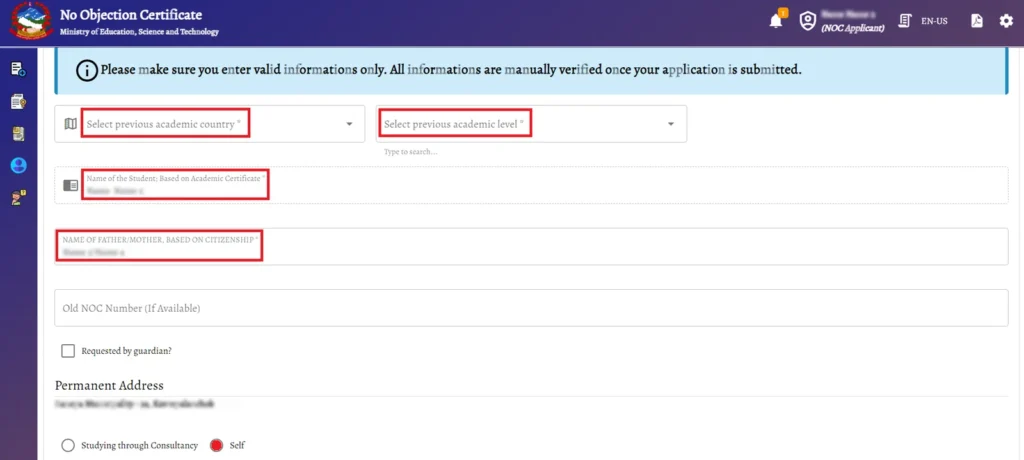
- Select your academic background and run Show Result: Choose your previous academic country, level, and stream/faculty. For study completed in Nepal (+2 or a Nepalese university), select your board or university, enter your registration number and date of birth, and click Show Result so the portal pulls your verified academic data automatically. If you need to convert between BS and AD dates accurately while filling forms, use our English-to-Nepali Date Converter.
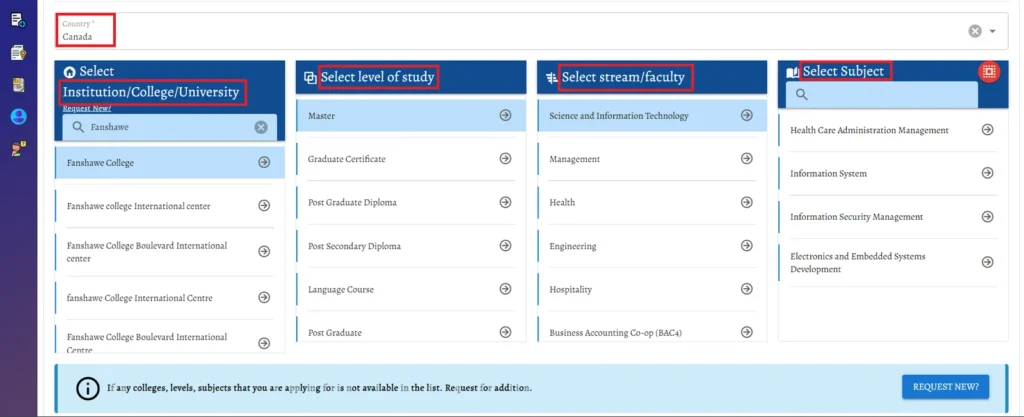
- Choose your destination, institution, and application type: Pick the destination country, then search and select your university, level, stream/faculty, and exact subject. If your accredited university or subject is missing from the list, click Request New inside the portal to submit an addition request online (do not visit the office for listing requests). Mark Self if you are applying independently or Studying through Consultancy if an agency is assisting you.
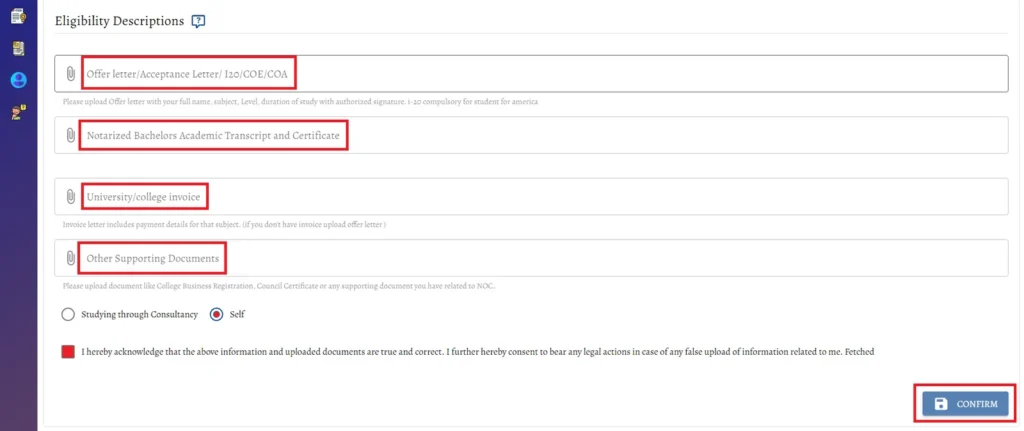
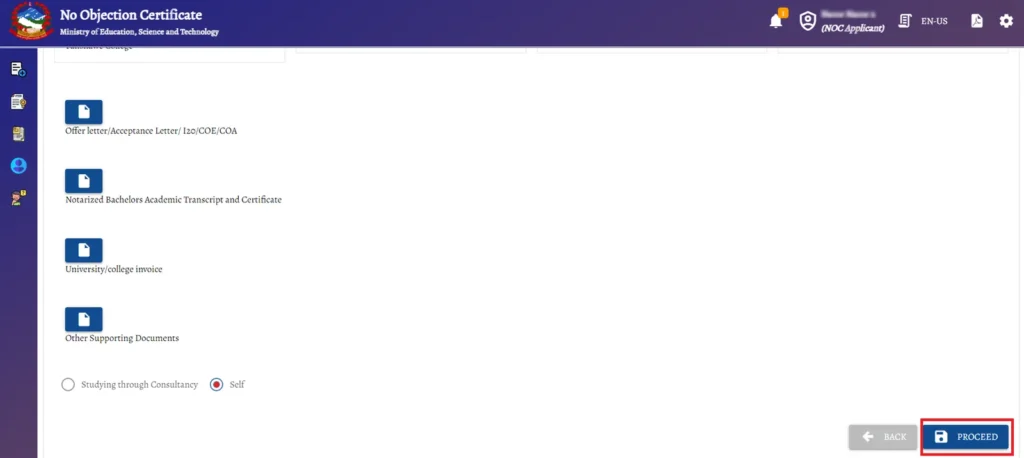
- Upload required PDFs and submit: Attach the required documents for your level and programme, review every detail carefully, and click Proceed to submit.
- Pay NPR 2,000 per subject once verified: When My NOC changes to Application Verified / Waiting Payment, pay NPR 2,000 per subject using your system-generated EBP / Voucher Number (Revenue Head 14229, Rastriya Banijya Bank):
- eSewa: Go to Government Payment → No Objection Letter, enter your EBP/Voucher number and NPR 2,000, and confirm.
- Khalti: Go to IRD (Inland Revenue Department) → select Rastriya Banijya Bank (RBB), enter your EBP/Voucher number, and input NPR 2,000.
- connectIPS: Choose Government Payment → IRD / GON Revenue Payment, select your bank account, and enter your EBP/Voucher number and NPR 2,000.
- Download your digital NOC from My NOC: After payment is confirmed and your application reaches Approved, download the digital NOC directly from My NOC. You do not need to visit Sanothimi to collect it if your CIMS and central academic records matched.
When is an in-person office visit still required?
Per MoEST’s 2083/08/08 notice, consultancies must not tell applicants that everyone has to appear physically. You only need an in-person visit to the NOC office if your citizenship (DOB) verification or academic details fail to match in the central information management system. In that case, you or an immediate family member (ekagharko nata khulne vyakti) must bring your original academic certificates and original citizenship certificate (plus relationship proof if a family member visits) for approval.
Understanding My NOC application statuses
Log in at noc.moest.gov.np and open My NOC to check where your file sits:
| My NOC status | What it means and what you should do |
|---|---|
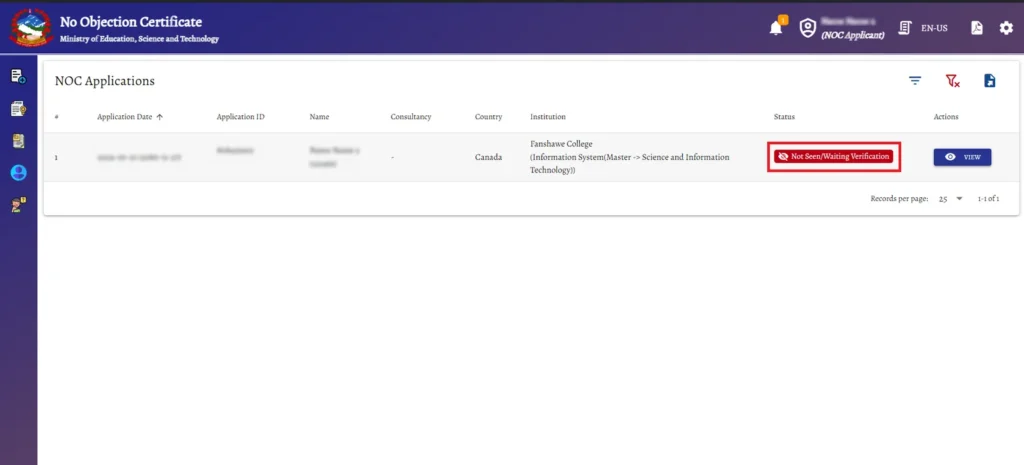
| Not Seen / Waiting Verification | Your form is in the queue for initial review. Wait for verification updates or email alerts. |
| Application Verified / Waiting Payment | Your initial submission passed review. Generate/check your EBP voucher and pay NPR 2,000 per subject via eSewa, Khalti, or connectIPS. |
| Awaiting Review / Application Reviewed | MoEST flagged an item for review or re-verification; follow any remarks shown in your dashboard. |
| Payment Successful / Waiting Approval | Your NPR 2,000 payment is recorded and your NOC awaits final approval. |
| Approved | Your NOC is ready. Download the digital NOC from My NOC for your bank and visa records. |
| Rejected / Cancelled | Check the rejection or cancellation remark in My NOC, fix the missing document or mismatch, and reapply if eligible. |
Frequently Asked Questions
How do I log in to My NOC and check my application status?
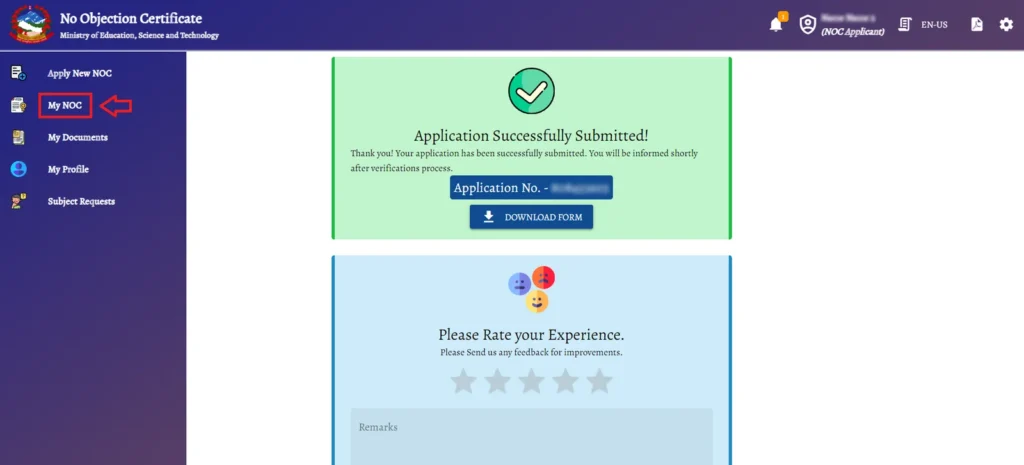
Go to noc.moest.gov.np, click Login in the top-right corner, and sign in with your registered mobile number and password. Open My NOC in the left menu to see your live status, pay your voucher once verified, or download your approved digital NOC.
How much is the Nepal NOC fee and how do I pay it online?
The official fee shown inside the MoEST NOC portal is NPR 2,000 per subject (Government Revenue Head 14229 at Rastriya Banijya Bank). Once your status changes to Application Verified / Waiting Payment, pay online through eSewa, Khalti, or connectIPS using your system-generated EBP/Voucher number.
Do I still need to visit Sanothimi in person to collect my NOC?
No—not if your records verify online. MoEST’s 2083/08/08 notice confirms that NOC application, subject/college requests, verification, and collection are all 100% online. You (or an immediate family member with relationship proof) only need to visit the NOC office with original citizenship and academic certificates if your citizenship DOB or academic record fails to match in the central information management system.
What if my foreign college or subject is missing from the dropdown?
Click Request New directly on the application screen inside noc.moest.gov.np and submit the university, level, stream, and subject details online. Verify beforehand that your university is officially accredited in its host country per MoEST’s accreditation notice.
Do engineering graduates need an NEC license or TU/UGC equivalence for NOC?
If you completed a bachelor’s degree in engineering and are applying for an NOC for a Master’s degree, MoEST’s live portal FAQ lists a council license (such as your Nepal Engineering Council registration) among required documents for professional degrees. If your previous degree was awarded outside Nepal, you also need an equivalence certificate.
How long does NOC approval take, and whom do I contact if something is stuck?
MoEST does not publish a fixed day-count guarantee; CIMS- and university-matched applications move through online approval faster than files needing manual or physical verification. For stuck verifications, email noc@moest.gov.np or call 01-6635419.
Official sources
- MoEST NOC Online Portal (
noc.moest.gov.np) - MoEST NOC Service Delivery & Consultancy Notice (2083/08/08 / Nov 24, 2026)
- MoEST University/College Accreditation Notice (2082/12/02)
- MoEST Official NOC User Manual (PDF)
- Ministry of Education, Science and Technology (MoEST)
Earlier process: step-by-step reference
Step-by-Step Guide to Apply NOC Online
Here’s how I applied for my NOC online, broken down into clear steps.
You can follow these on the official NOC portal at No Objection Certificate.
1. Visit the Official Portal
Visit the official NOC application portal i.e. Ministry of Education, Science, and Technology (MoEST).
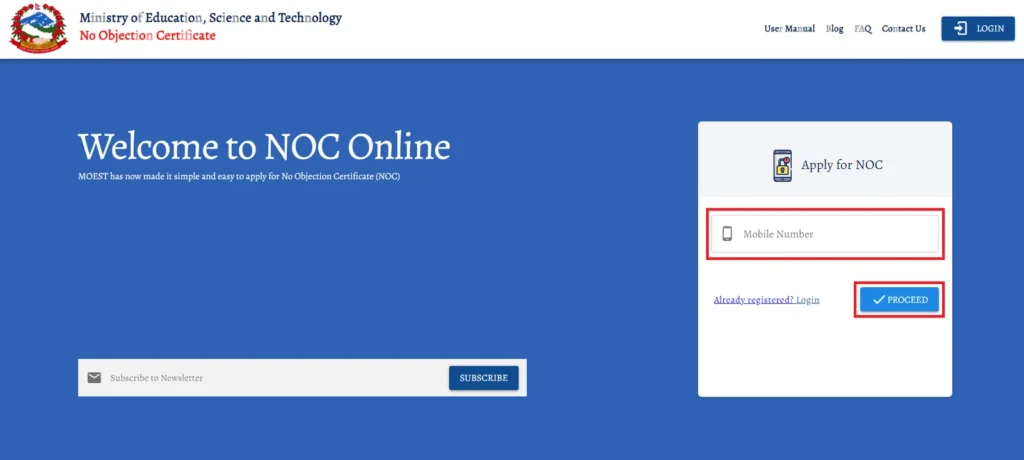
2. Enter Mobile Number and Email
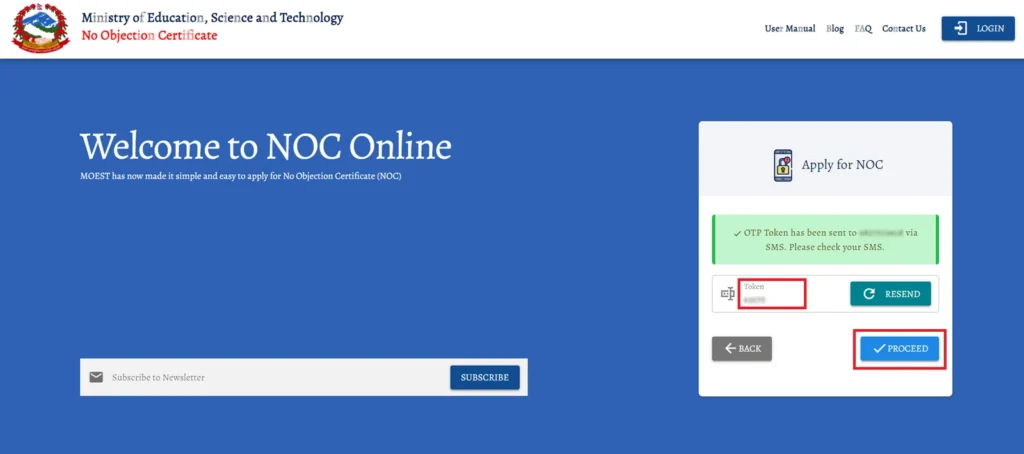
You’ll need to enter your NTC mobile number; Make sure the service provider is NTC, otherwise you will not get OTP.
After submitting, you’ll receive a one-time password (OTP) via SMS.
Enter the OTP to verify your mobile number.
If you don’t receive it within two minutes, click Resend to get a new one.
3. Set a Password
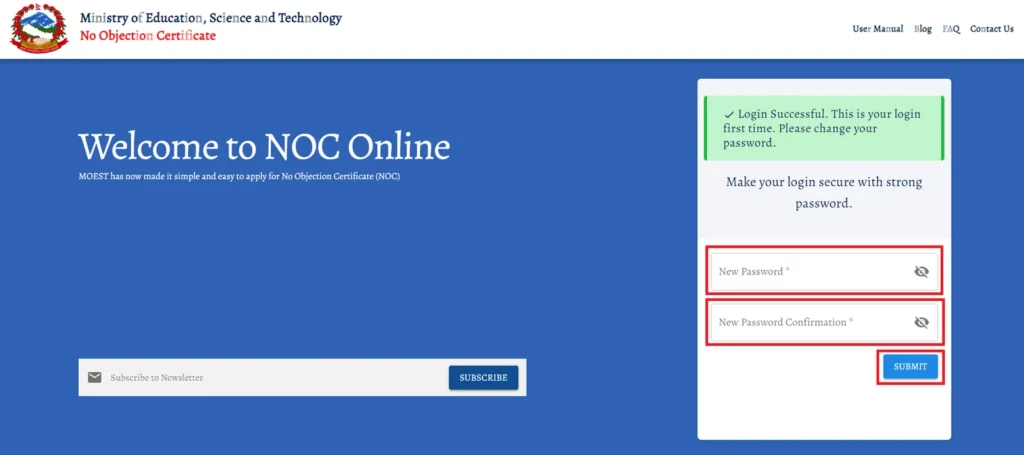
Create a secure password for your account.
I chose something easy to remember but strong, then confirmed it by entering it twice.
5. Verify Your Email
Next, provide your email address.
A verification token will be sent to your inbox (check spam if needed).
Enter the token and click Verify Email to confirm.
6. Complete Citizenship Details
Fill in your citizenship details, including your citizenship number, date of birth, district of issue, full name, parents’ names, and permanent address.
Then, upload a combined image of your citizenship certificate (front and back) and your passport-sized photo.
Ensure the file is under 5 MB.
7. Add Passport Details
Enter your passport number and date of birth, then upload a scanned copy of your passport.
I made sure the scan was clear to avoid rejection.
8. Provide Academic Background
Select the country where you previously studied, your academic level (e.g., +2, Bachelor’s), and field of study.
If you have a previous NOC, enter its number; otherwise, skip this part.
9. Specify Future Study Plans
First, choose your study destination (e.g., Canada, Australia), and then select your institution, level of study (e.g., Bachelor’s, Master’s), stream/faculty, and specific subject.
However, if your institution isn’t listed, click Request New to add it.
10. Upload Documents
Next, upload your offer letter, notarized academic transcripts, and any supporting documents like language test results.
As for the application type, I marked Self since I applied on my own; however, select Studying through Consultancy if you’re applying through an agency.
11. Review and Submit
Double-check all details and documents.
Once you’re sure everything is correct, click Proceed to submit.
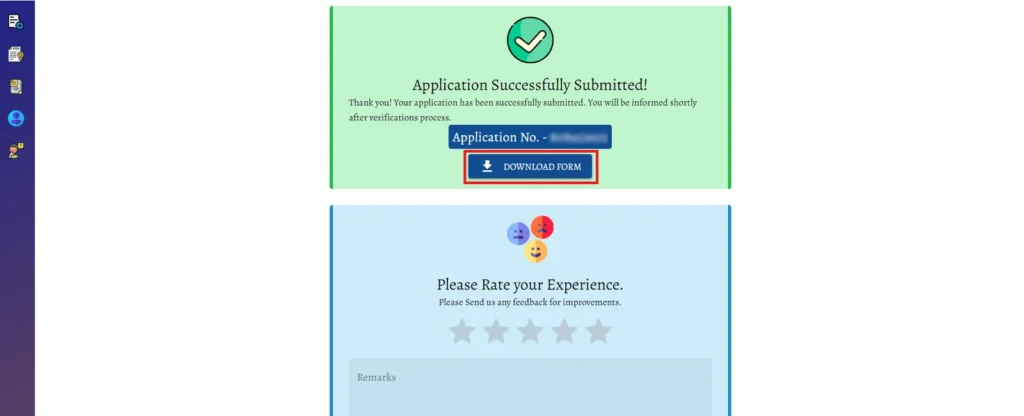
You’ll see a confirmation page with an application ID and a Download Form button.
I downloaded the form immediately for my records.
What Happens After You Apply NOC Online
After submitting, you can then track your application status on the portal under the My NOC section.
Initially, it’ll show Not Seen/Waiting for Verification.
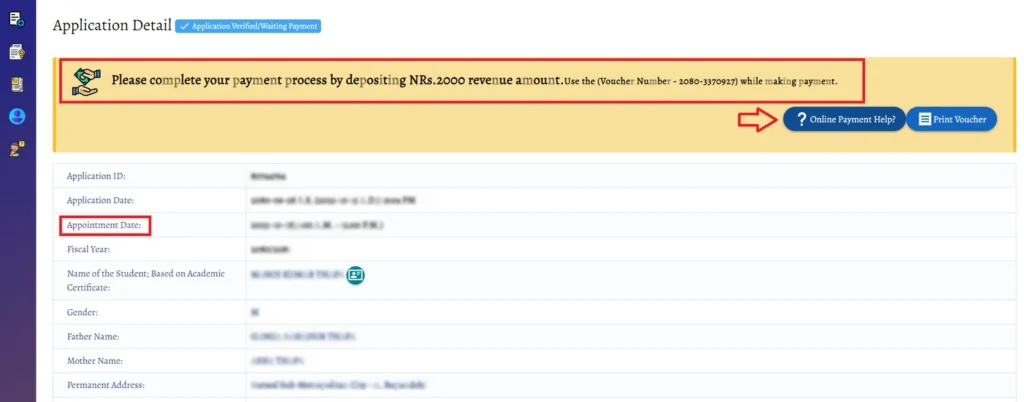
In my case, it took about 3–5 days for the status to update to Application Verified/Waiting for Payment.

1. Making the Payment
Once verified, you’ll need to pay NPR 2,000.
You can do this at Rastriya Banijya Bank or via online platforms like Khalti or eSewa.
Alternatively, I used eSewa for convenience and saved the receipt, which you’ll need later.
2. Scheduling an Appointment
After payment, the portal provides an appointment date and time to collect your NOC from the MoEST office in Sanothimi, Bhaktapur.
I marked my calendar to avoid missing it.
3. Visiting the NOC Office
On your appointment day, bring these documents:
-
Offer letter or I-20
-
Original and photocopies of academic certificates
-
Payment receipt
-
Downloaded NOC form
-
Original and photocopy of your passport and citizenship certificate