On this page
You can apply for a Nepal Police Clearance Certificate (PCC) through the official Online Police Clearance Registration system (OPCR). Register, confirm your email, complete the application, upload the documents requested for your situation, and follow progress through your account. Nepal Police issues the police report free of charge, as confirmed in its official service notice.
The Nagarik App is another application option recognised in the Nepal Police OPCR FAQ. This guide focuses on the website and the problems you may need to resolve before downloading your certificate.
Last reviewed: November 21, 2026. The public registration screens, official help diagram, certificate-verification form, and Nepal Police FAQ were checked. Follow the current instructions inside your own application for upload and correction requirements.
Before you apply
A PCC is a police character/criminal-record document, often called a police report or प्रहरी चारित्रिक प्रमाणपत्र. Start with the checklist from the organisation requesting it: check the document name, when it must have been issued, and whether separate consular attestation is required. A police certificate application does not complete a visa, employment, or university application for you.
For study-abroad paperwork, your Nepal NOC application and WES credential evaluation serve different purposes. Follow each requesting organisation’s instructions rather than assuming that everyone needs all three documents.
Documents to prepare
The live OPCR registration page first asks whether you are Nepali, a foreigner, or a refugee. The checklist below is for the Nepali applicant option; other applicants should select their own category and follow its requirements.
| Document | When the Nepali-applicant screen requires it |
|---|---|
| Applicant image | Listed as “User Image”; the official help diagram asks for a recent passport-size colour photo. |
| Citizenship certificate | The screen lists this for applicants above 16. Prepare clear images of the document, including both sides where requested. |
| Minor certificate | Listed for applicants below 16. If you are exactly 16 or your document situation is unclear, ask OPCR support which evidence to use. |
| Marriage certificate | If you want the certificate to include your spouse’s name. |
| Address verification / Basai Sarai | If you have recently moved residence. |
| Passport | If applying for a visa purpose. Follow the upload fields for the required pages. |
| Departure document | If living in a foreign country. Check the overseas-applicant guidance below if your departure evidence is missing. |
Keep an email address and mobile number you control available for registration. Compare your name, date of birth, passport details, and address with the documents before starting: information entered at account registration can affect the certificate.
Photo and selfie guidance
The official OPCR help diagram asks for a recent passport-size colour photo. Use a clear image and follow the upload field’s current instructions.
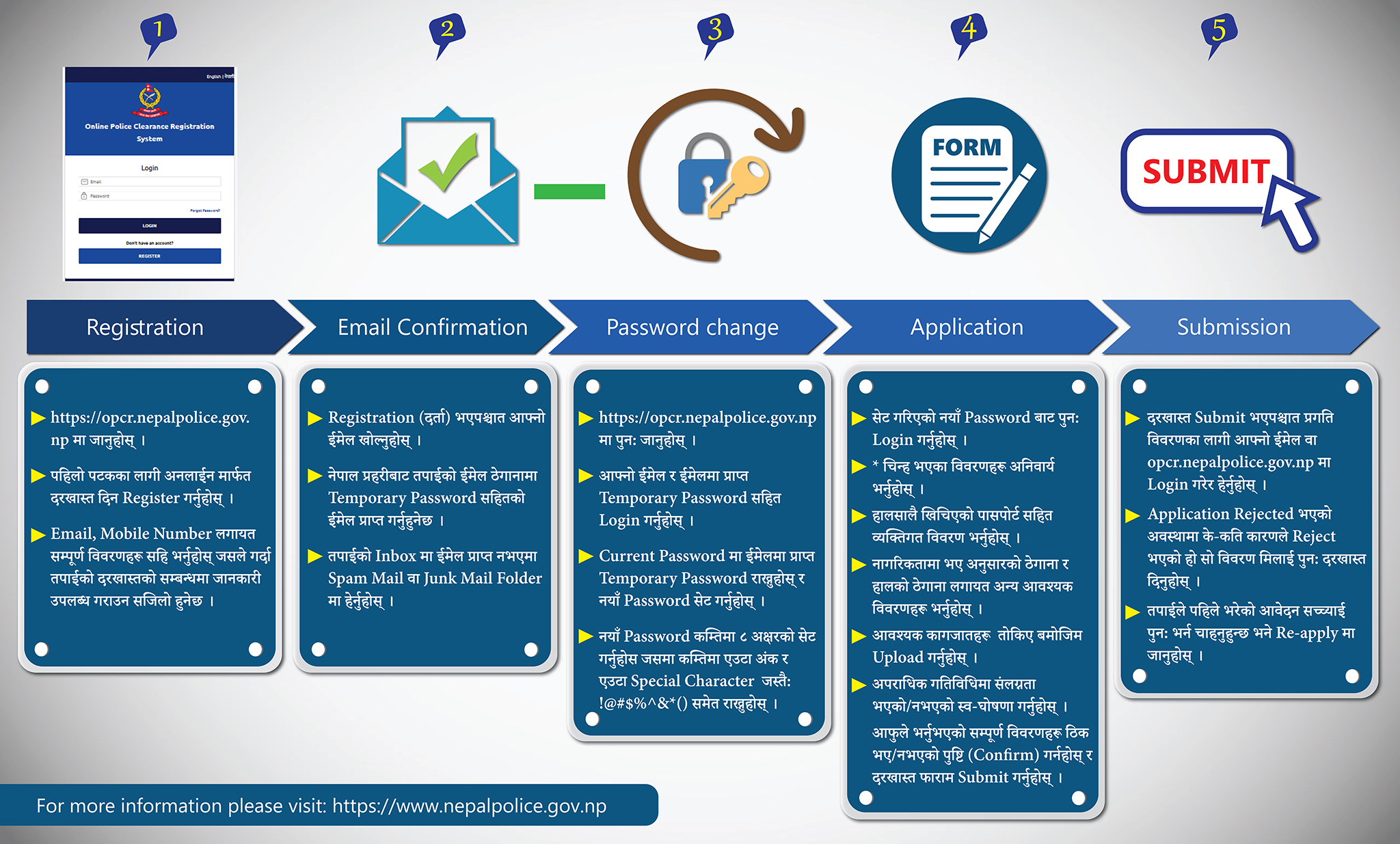
The public official material checked did not establish a compulsory live-selfie rule, fixed photo dimensions, or a numeric upload-size limit. If your application presents a camera/selfie step, follow its on-screen instructions; ask support if the requirement or camera access is unclear. Do not assume a social-media selfie meets the photo instructions or resize files to a limit copied from a blog.
How to apply through OPCR
These steps follow the portal’s official application flow. Screen labels may change as the service is updated.
1. Register under the correct applicant category
Open the official OPCR portal and select REGISTER if you do not already have an account. Choose your applicant category, read the document checklist, and enter the requested identity and contact details carefully.
If you already have an account, log in. Use Forgot Password? if you cannot access it instead of immediately creating another account.
2. Check your email and change the temporary password
The official flow says Nepal Police sends a temporary password to the email used for registration. Check your inbox and spam/junk folder, then log in and set a new password following the portal’s password rules.
If the temporary password does not arrive, the police FAQ directs you to the password-reset option using your registered email and the other requested details.
3. Complete your identity, address, and declaration details
Fill in the application using your documents. The official flow asks for personal information, the address recorded on citizenship, your current address, and a declaration about criminal involvement. Answer accurately; contact support if a discrepancy needs explanation.
Check which calendar a date field expects. If you need to compare a BS date on a Nepali record with an AD date, use the English-to-Nepali date converter, which works in both directions. Compare the result with your official records; a conversion does not resolve conflicting dates on identity documents.
4. Upload, review, and submit
Upload the documents requested for your category, purpose, and residence. Check that names, numbers, dates, stamps, and document edges remain readable after uploading.
Review the full application before confirming it. Pay particular attention to account-name spelling, citizenship and passport numbers, date of birth, and permanent versus current address. Submit only after checking the declaration and required attachments. Keep your application ID and any submission messages for follow-up.
5. Check application status and respond to instructions
The official flow directs applicants to their email or OPCR login for progress. Sign in with the account used to apply, open your submitted application, and read its status and any remarks. Do not rely on an unofficial status-checking website.
If the application is rejected, read the stated reason and correct that issue before applying again as instructed. The official flow describes a Re-apply option for an earlier application, but issued-certificate corrections can have additional restrictions—see below before starting over.
6. Download and check the issued certificate
Once issued, download the certificate through your OPCR account and check the details before sending it onward. Nepal Police’s FAQ says headquarters does not provide a hard copy: download it and make a colour print if needed.
To check an issued certificate’s authenticity, use the official certificate-verification form. It asks for the dispatch number, last name, date of birth, and CAPTCHA. This is separate from tracking a pending application; a dispatch number belongs to an issued certificate.
Applying from outside Nepal
Select your actual residence situation and prepare the departure document listed by OPCR. Nepal Police’s service explanation identifies passport pages and the stamp from the last departure from Nepal as supporting evidence for overseas applicants; use your current application’s fields to determine exactly what to upload.
The official FAQ addresses two difficult cases:
- Lost passport or unreadable departure date: It directs you to request a departure-date letter from the Immigration Office at Kalikasthan, Dillibazar, Kathmandu, identifying the passport used for travel, and upload that letter in the departure field. Ask support about arrangements if you cannot attend from abroad.
- Departure through Delhi or another international airport instead of Tribhuvan: It directs you to obtain a ward recommendation stating the departure date and upload it under additional documents.
Check the FAQ and confirm your case with support before arranging documents or sending someone to an office.
Nagarik App: check imported details before submitting
Nepal Police recognises applications made through the Nagarik App in its OPCR FAQ. If using that route, open its police-clearance service and follow the current app prompts. Review the identity details supplied by the app before submission.
If a certificate contains incorrect details inherited from Nagarik App, the FAQ says to have the app’s underlying details corrected through the District Administration Office and apply again, or complete the form through OPCR. Ask support how to handle an already-issued certificate before creating a duplicate application.
Delays, holds, and common errors
How long does it take?
The police FAQ gives 2–3 days excluding public holidays when details do not match a suspected person’s record. This is conditional. Nepal Police’s issuance notice also explains that name matches, incomplete records, and replies needed from other police offices can delay verification. Do not plan an appointment around a guaranteed completion date.
Application on hold
A hold is not, by itself, a finding that you have a criminal record. The FAQ explains holds caused by details matching a suspected person’s record. It directs applicants to contact the Conduct Branch (चालचलन शाखा), Nepal Police Headquarters, with a citizenship copy and application ID. It says a relative can attend if you cannot be present. Contact support first to understand what your specific case needs.
“Server could not generate response data”
The FAQ says this commonly happens when uploaded photos are too large. Reduce the image size while keeping it readable, then retry as instructed. If the error continues, report the exact message to support rather than repeatedly submitting the same files.
Certificate will not download
Try another browser or a private/incognito window, as the FAQ recommends. Log in to your own account again and retry the download.
Name or other details are wrong after issue
Do not edit the certificate file yourself. The FAQ describes a 90-day restriction after dispatch and a Saturday 10:00–17:00 correction/reapplication window. It separately advises a new email and application for an account-name error. Because the appropriate route depends on the error, confirm the current process with OPCR support before opening another account or relying on that window.
Official support and attestation questions
The live OPCR login page lists:
- Email: opcr@nepalpolice.gov.np
- Telephone: +977 01-5719865 or 9851285920
- Office hours shown at review: 09:00–16:00 Nepal time. Recheck the live footer before calling.
Have your application ID, the exact error/status, and a short explanation ready. Never send your password or verification code.
Police issuance and consular attestation are separate tasks. Ask the receiving embassy, immigration authority, university, or employer whether attestation is required, then use the Department of Consular Services for its current process and charges. A missing consular reference number is not an OPCR status problem: the police FAQ directs that query to Consular Services.
Frequently asked questions
Is the Nepal Police Clearance Certificate free?
Yes. Nepal Police confirms free issuance. Printing, private assistance, or a separately required consular service can have other charges; do not confuse them with the police application fee.
Can I apply without a passport?
The public Nepali-applicant checklist specifically requires a passport for a visa purpose. Follow the document requirements for your selected purpose and category; ask OPCR support if you need a visa-purpose certificate but do not have the required passport.
Is a live selfie compulsory?
The public official instructions checked require an applicant image and describe a recent passport-size colour photo. They did not establish a universal live-selfie requirement. Follow any capture instructions shown in your own application and ask support if they are unclear.
Do I need to travel to Kathmandu to collect the certificate?
The police FAQ says to download it from OPCR and colour-print it if needed; headquarters does not issue a hard copy. A hold or missing departure evidence may require separate follow-up with the relevant office.
Can I track an application using the public verification page?
No. Track your submitted application through your account and email. The public certificate search checks an already-issued certificate using its dispatch number and identity details.
How long is the certificate valid for a visa or DV case?
Check the receiving authority's current instructions for how recent your certificate must be and when to obtain it. This guide does not establish a universal three- or six-month period. For a DV application, start with the official case instructions; our DV result guide explains how to reach the official status-check route.
Official sources and related resources
The application guidance above draws on the OPCR portal, its application-flow diagram, the Nepal Police OPCR FAQ, and the linked police service notices. Recheck these when applying, especially for document, correction, support, and timing changes.
For the next task in your paperwork:
- Nepal NOC application guide — the separate education-ministry process for study-abroad paperwork.
- WES evaluation guide — academic credential evaluation.
- DV lottery result guide — finding official selection status and case instructions.
- English-to-Nepali date converter — compare BS and AD dates before entering them into a form.